
Accessibility tooling has a fragmentation problem. You have browser DevTools, standalone audit tools, CI linters, and various plugins, but none of them give you a clean, in-context view of WCAG violations while you are building or reviewing a page. You end up context-switching constantly: run a tool, read a report, go back to the page, repeat.
Za11y is a Chrome extension that scans any page from a persistent side panel, surfaces violations by severity and WCAG level, lets you highlight issues directly on the page, and exports structured reports.
This article covers the architecture decisions, the constraints Manifest V3 imposed, and the engineering patterns behind it.
Za11y is available on the Chrome Web Store .
Za11y UI Screenshots
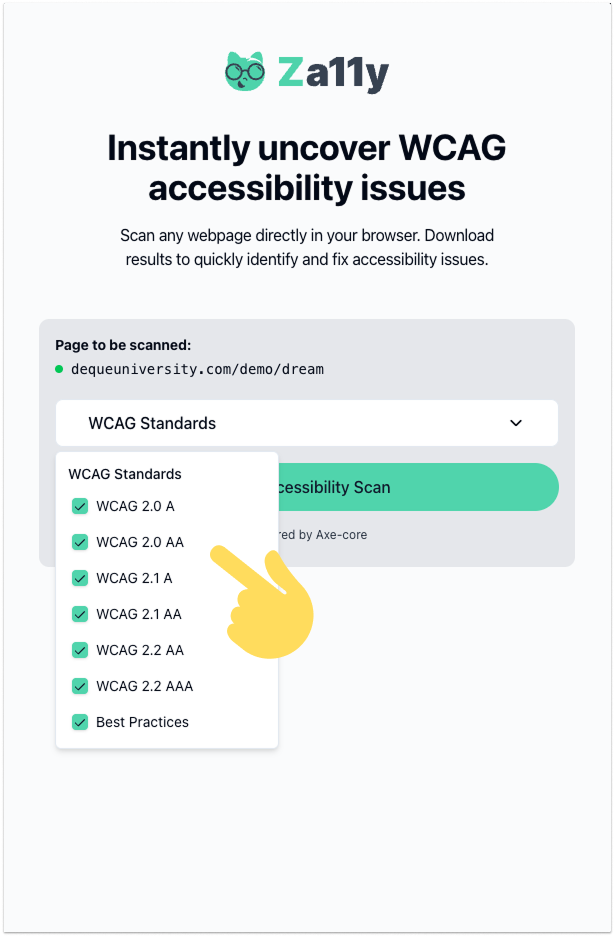
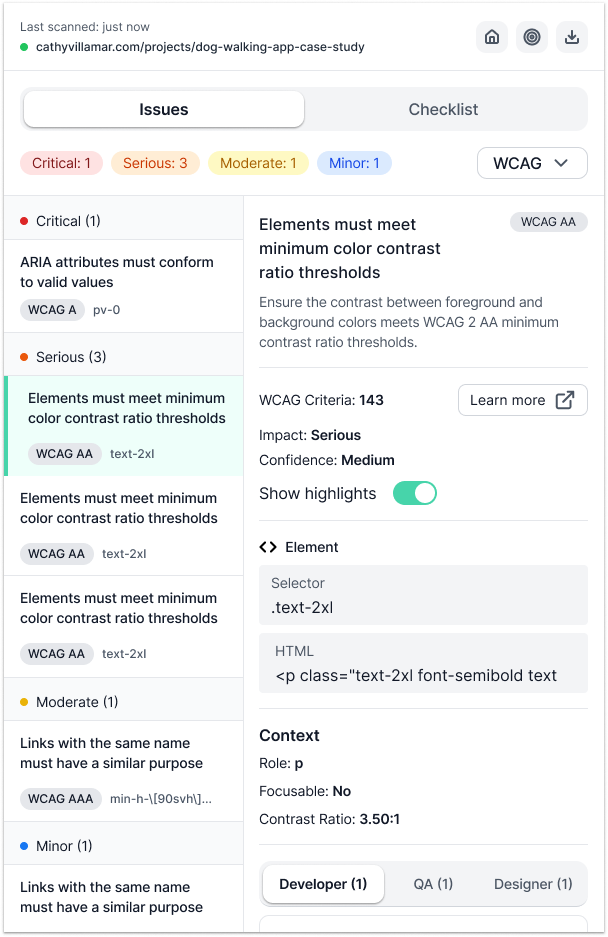
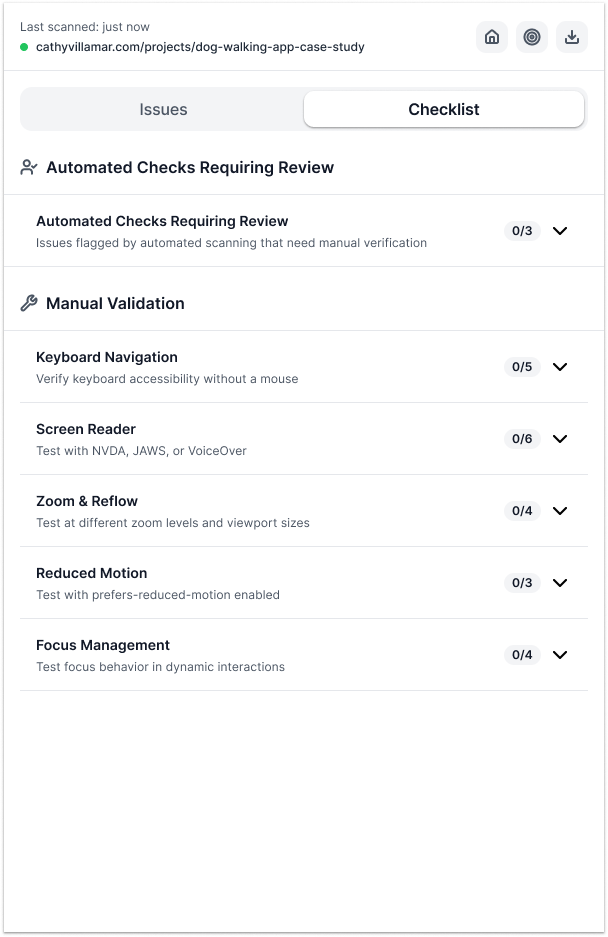
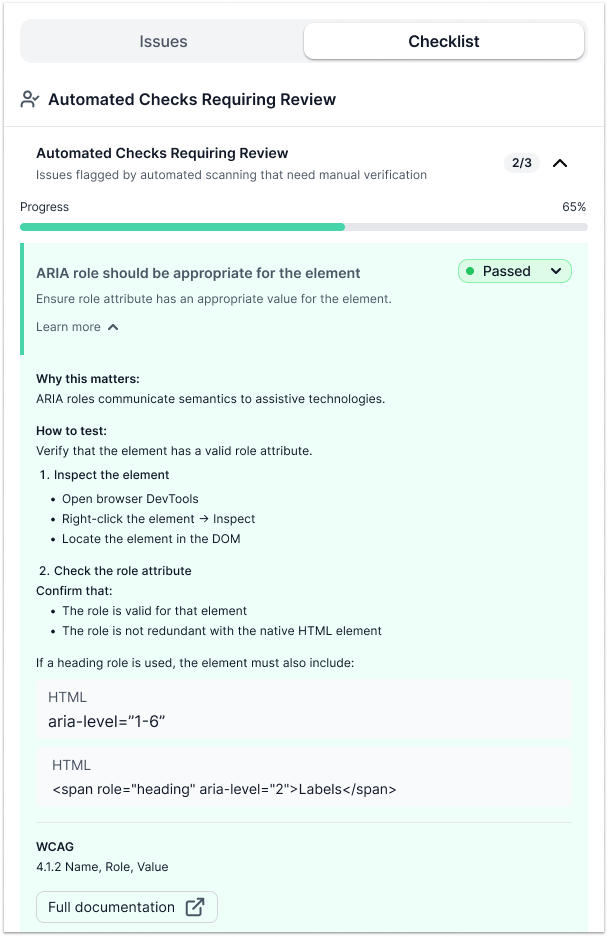
Before jumping into the technical decisions, here is what using Za11y actually looks like. The screenshots below walk through the full workflow:
- Picking WCAG conformance levels before running a scan.
- The issues list: violations grouped by severity, with the WCAG criterion, selector, and role-specific guidance per item.
- The Checklist tab covering automated checks that need human review and five manual categories: Keyboard Navigation, Screen Reader, Zoom and Reflow, Reduced Motion, and Focus Management.
- An expanded automated check requiring human review, showing pass/fail status, overall progress, why the rule matters, and how to verify it manually.
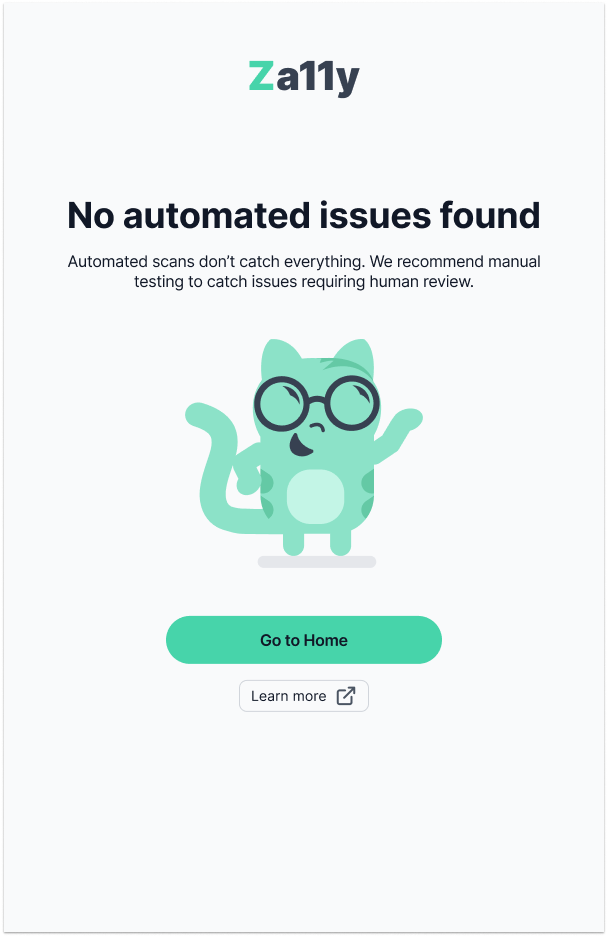
- The empty state when no automated issues are found.
Choosing the Platform: Manifest V3
The first decision was the platform. A DevTools panel would have worked, but it requires DevTools to be open; not how most people review pages. A bookmarklet can be injected anywhere but has no persistent UI and no access to browser storage. A Chrome extension gives you everything: persistent UI, storage, DOM access, and a place to live in the browser's own chrome.
The catch is that Chrome extensions now require Manifest V3, which replaced the old persistent background page with an ephemeral service worker. That one change ripples through the entire architecture.
In MV2, you could store state in the background page and read it any time. In MV3, the service worker can be killed by Chrome whenever there is nothing to process. When it wakes back up, all in-memory state is gone. Many extensions work around this by continuously pinging the worker to keep it alive, which is exactly the kind of hack the Chrome team was trying to eliminate.
The cleaner path: treat the service worker as stateless. It is a message router, nothing more.
| Layer | Role |
|---|---|
| Service Worker | Routes messages, owns no state |
| Side Panel | React 19 app, owns transient UI state |
| Content Script | Runs axe-core, injects overlays into the page |
- Persisted state (scan results, checklists, settings): stored in
chrome.storage.local - Transient state (current scan, active filters, selected issue): stored in React context inside the side panel
- Service worker behavior: when it wakes up, it reads nothing, holds nothing, and forwards everything
The Three-Tier Architecture
With the state model settled, the architecture falls into three layers communicating via message passing:
| Layer | Communicates via |
|---|---|
| Service Worker (ephemeral, stateless) | chrome.runtime messages |
| Side Panel (React 19, CSR) | chrome.runtime messages |
| Content Script (injected into the page; axe-core runs here) | chrome.runtime messages |
The content script is the only layer that can access the page's DOM; Chrome's security model enforces that boundary. So axe-core runs there. When the user clicks "Scan" in the side panel, the message travels up to the worker, which injects the content script and forwards the scan request. The content script runs the scan, then sends results back up through the worker to the side panel.
There is one secondary channel: when the user clicks a highlight overlay on the page, that injected DOM element cannot reach chrome.runtime directly. Instead it fires a window.postMessage, which the content script intercepts (validating event.source === window to prevent spoofing) and forwards to the side panel via sendMessage(). This keeps the overlay markup minimal while preserving the security boundary.
One subtle problem: the content script might not be ready when the worker tries to message it. The @crxjs/vite-plugin's ?script loader uses an async import() internally: executeScript() resolves before the module has finished initializing. The fix is a polling utility that retries sendMessageToTab() up to 10 times at 100ms intervals, giving a 1-second window for the content script to initialize. Without it, first-load scans fail with no visible error.
The worker also maintains a blocklist: chrome://, chrome-extension://, the Chrome Web Store, and about: pages reject scan requests immediately. Trying to run axe-core against the webstore itself causes extension policy violations.
Type-Safe Messaging with Zod
chrome.runtime.sendMessage() accepts any serializable object. There is no type enforcement at the boundary, which means as the codebase grows, message shapes drift and handlers silently break.
The fix is a Zod discriminated union covering every message type:
const MessageSchema = z.discriminatedUnion('type', [
    ScanRequestSchema,
    ScanCompleteSchema,
    ScanErrorSchema,
    HighlightIssueSchema,
    ClearHighlightsSchema,
    TogglePickerSchema,
    InspectElementSchema,
    UpdateIssueStatusSchema,
    OpenSidePanelSchema,
    GetCurrentUrlSchema,
    CurrentUrlUpdateSchema,
]);
Every message is validated before sending and again on receipt. Invalid messages are logged and dropped; they never reach a handler. This caught real bugs during development where a refactor changed a field name on one side but not the other. The parse error surfaced immediately instead of manifesting as a mysterious UI bug.
The Scanning Engine
axe-core runs inside the content script. Each scan is configured with the WCAG tags the user selected (2.0, 2.1, 2.2, A/AA/AAA, plus best-practice) and returns two distinct lists. Iframes are scanned as well; iframes: true is passed to axe.run(), which most page scanners skip entirely.
- Violations: confirmed issues that axe can determine with high-to-medium confidence
- Incomplete: items axe flagged but cannot definitively classify; they require a human decision
The distinction matters. axe-core returns incomplete results when the HTML pattern is ambiguous: color-contrast calculations on semi-transparent overlays, elements that may or may not be keyboard-reachable depending on script behavior, images whose names need contextual verification. Merging these into the violation count would overstate confidence. Za11y keeps them in a separate tab, labelled clearly as "needs review," and excludes them from the summary total. An incomplete result is not a confirmed issue; it is a prompt to investigate.
axe-core cannot cover everything: keyboard navigation flows, screen reader announcement quality, motion reduction compliance, focus management across page transitions. Za11y ships a manual checklist for these (five categories, 22 checks) precisely because automated scanning has a ceiling. axe-core finds roughly 30-40% of WCAG issues. The rest requires a human.
The content script injects overlay elements into the page during highlighting; if these were not excluded, they would appear as false violations on the next scan. Every injected element gets a za11y class prefix, and the axe configuration excludes anything matching that selector.
Each raw axe result gets transformed into a structured Issue object. Beyond what axe provides, each issue gets enriched with:
- A UUID for stable identity across scans
- The accessible name of the flagged element, computed via
dom-accessibility-apirather than readingaria-labeldirectly. An element's accessible name can come fromaria-label,aria-labelledby, a referenced<label>, inner text content, atitleattribute, or a combination; the ARIA spec defines a priority chain. Readingaria-labelalone misses most of it.dom-accessibility-apiimplements the full algorithm, so the name shown in the issue panel matches what a screen reader would actually announce. - Role-specific recommendations: separate guidance for the developer (fix approach with code), the QA engineer (how to verify the fix), and the designer (color contrast, target size, visual alternatives).
- A custom metadata layer (
ruleMetadata.ts) that adds "why this matters" explanations, step-by-step test instructions, and known false-positive warnings for specific axe rules.
Built for the Review Workflow
Accessibility review is not a one-pass process. You identify a violation, navigate to the element, check its context, return to the list, and move to the next one. The tool needs to support that rhythm, not interrupt it.
A popup (the default Chrome extension UI surface) collapses the moment you click anywhere outside it. For a review tool, that is the wrong behavior: every time you click a link to navigate deeper into the site you are testing, the violation list disappears. The side panel API, available since Chrome 114, solves this. The panel stays open alongside the page, scrolls independently, and persists across navigations.
On-page highlighting turns that persistence into a workflow. When you select a violation from the panel, the content script injects a colored overlay directly over the flagged element, positioned at the maximum CSS z-index so it renders above any stacking context the page creates. You see the element in its real context: surrounded by its actual content, styled with its actual CSS. axe-core gives you a selector string. Za11y shows you the element.
The result is an interaction loop: select a violation, see it highlighted on the page, investigate the surrounding context, return to the panel. That loop, and the persistence that makes it possible, is what separates a review workspace from a one-shot audit report.
Testing
Testing a Chrome extension means working across three execution contexts with different APIs, different environments, and no shared runtime. The strategy reflects that reality.
Coverage is enforced at 80% for lines and statements, 75% for functions and branches. The data layer is held to those floors without exception; UI components sit lower because testing every render permutation has diminishing returns compared to testing what feeds them. Content scripts are excluded from coverage entirely; they run in the browser tab context and are exercised through integration behavior, not unit tests.
Chrome APIs and axe-core are fully mocked. The test environment is Vitest with happy-dom. Shared fixtures define the canonical shape of an Issue and a ScanResult; no test constructs either by hand. When the type drifts, the fixture fails first, not a production bug.
The rule throughout: when a test fails, the implementation is wrong. Weakening assertions to pass tests has never been the answer.
What the Constraints Got Right
Building a Chrome extension in 2026 means accepting constraints. Manifest V3's ephemeral service worker, the security boundaries between execution contexts, the 10MB storage ceiling: each one is a wall.
Walls are interesting. The stateless service worker forced a design that would have taken real discipline to choose voluntarily: no shared mutable state, no long-lived processes, no stale data accumulating in the background. The security boundary between the content script and the extension pages made message passing mandatory, and message passing with Zod validating every boundary is exactly what made the architecture testable in isolation.
The constraints were not obstacles to work around. They were the architecture.
Not everything was forced. Separating violations from incomplete results, shipping a manual checklist alongside the scanner, computing accessible names with the full ARIA algorithm instead of reading a single attribute: those were choices. The platform had to be clean. The product chose to be honest.
The extension UI follows the same WCAG rules it scans for: semantic HTML, keyboard navigation, focus management throughout. An accessibility tool that cuts corners on accessibility is not a tool worth using.
Za11y is available on the Chrome Web Store.
Tech Stack
| Tool | Role |
|---|---|
| axe-core | WCAG scanning engine; runs inside the content script, returns violations and incomplete results |
| dom-accessibility-api | Computes accessible names using the full ARIA name-computation algorithm |
| Vite + @crxjs/vite-plugin | Manifest generation, HMR for the side panel, code splitting for content scripts and worker |
| shadcn/ui + Radix UI | Component primitives with keyboard navigation and ARIA roles out of the box |
| Zod v4 | Message validation and storage schema enforcement |
| webextension-polyfill | Normalizes Chrome APIs to Promises; Firefox compatibility would require no refactor |
| vitest + vitest-axe | Unit testing across isolated execution contexts; axe assertions on rendered components |
| papaparse | CSV report export |