Every time you start a new Claude session, it forgets everything. The architecture decision you made last week. The pattern that burned you three times before you figured it out. The context behind why the codebase looks the way it does.
You start from scratch. Every. Single. Time.
That is not a Claude problem; that is how LLMs work. But it means most developers are using their AI assistant at maybe 30% of its potential. They get a smart stranger instead of a thinking partner who knows their codebase, their decisions, and their history.
The fix is a second brain: a structured knowledge base Claude reads at the start of every session, so your accumulated context, decisions, and patterns are available automatically.
What Is a Second Brain?
The term comes from Tiago Forte’s productivity framework: offloading memory into an external system so your 🧠 brain is free to think instead of remember.
Applied to AI-assisted development, it works the same way: instead of relying on Claude to remember things between sessions (it can't), you build a knowledge base that Claude reads. Your history becomes its context.
The shift: a compounding system. The longer you use it, the more context Claude has, the better the output. A smart stranger becomes a thinking partner who knows your project cold.
How It Works
Claude Code reads a CLAUDE.md file from your project root at the start of every session. Whatever is in that file becomes context before you type anything. Most developers use it for coding rules: naming conventions, architecture constraints, linting preferences.
The second brain takes it further: a standalone knowledge base that lives outside your codebase, not tied to any single project. You tell Claude where it lives once. From then on, every session starts with Claude already oriented.
Here is what that looks like in practice.
Starting a session. Claude reads the project README: active branch, what is in progress, what was last completed. You open the chat and Claude already knows where you are. No re-briefing.
During the session. The README holds a routing table that tells Claude which file to load based on the task. Before architectural work, it reads architecture_decisions.md, the file that captures why the codebase looks the way it does. Writing code, it pulls session_patterns.md, hard-won gotchas from previous sessions. Claude loads only what is relevant. Clean context, lower token cost.
Ending a session. You run /update-second-brain. Claude refreshes the README, logs the session, and captures any decisions or patterns that came up. Two minutes. The context you built today is available next session.
Over time. You revisit a part of the codebase you last touched three months ago. Claude already knows why it was built that way. No archaeology, no re-briefing. The sessions compound.
How to Set Up Your Second Brain
The second brain is only as useful as the habit behind it. Log decisions, document patterns, adjust as you go. What follows is the structure that fits my workflow today. Build the version that fits yours.
This is how mine is currently organized:
my-projects-structure
~/repos/ ├── my-project-a/ ├── my-project-b/ └── second-brain/ ├── VAULT-INDEX.md ├── templates/ │ ├── session.md │ ├── architecture_decision.md │ └── open_question.md ├── my-project-a/ │ ├── README.md │ ├── architecture_decisions.md │ ├── session_patterns.md │ ├── open_questions.md │ └── sessions/ │ ├── README.md │ ├── 2026-04-16-example-session.md │ └── 2026-04-19-example-session.md └── my-project-b/ └── ...
What each piece does
| File | Purpose |
|---|---|
VAULT-INDEX.md | Cross-project overview: all projects at a glance, their active branch and status. |
templates/ | Example blueprints Claude can follow when creating second brain documents. Use them as a starting point and adapt to what works for you. |
README.md | Session brief: current branch, what is in progress, what is next. Claude orients in seconds. |
architecture_decisions.md | Reasoning, not rules. CLAUDE.md says what to do; this file says why. Better edge-case decisions when the rules do not cover everything. |
session_patterns.md | Hard-won knowledge: the pattern that kept breaking, the anti-pattern repeated before someone wrote it down. Each entry has a why. |
open_questions.md | Unresolved items, tech debt, risks, questions to revisit. Visible without cluttering everything else. |
sessions/README.md | Index of all sessions for the project, newest first. One line per session linking to the full log. |
sessions/ | Memory: a short log per session covering what happened, what was decided, and what is next. This is what makes the system compound over time. |
Scaffold the second brain
The second brain is a single vault. One directory holds everything: multiple projects, personal notes, research, whatever you track. Run the prompt below once per project to add it. The first run creates the vault; each subsequent run adds to it. Treat the structure as a suggestion. Remove what does not serve your workflow, add what is missing.
Open Claude Code from the project you want to add and paste this prompt:
Prompt
Add this project to my second brain vault at ~/second-brain/. The second brain is a persistent knowledge base I read at the start of every session. Each file has a specific role: README.md loads every session; the other files load only when the task requires it. First, scan the project: read the README, CLAUDE.md, and key source files to understand the stack, structure, and any non-obvious decisions already made. Use what you find to populate the files below with real content, not placeholders. Create ~/second-brain/<project-name>/ with these files: README.md — loaded every session Purpose: orient instantly at session start, no re-briefing needed. - Last updated date (today) and current git branch - Active work: what is in progress right now - Recently completed: what just shipped - Routing table (two columns: File | Read when): architecture_decisions.md | touching architecture or non-obvious design session_patterns.md | writing any code open_questions.md | planning new work architecture_decisions.md — loaded on demand Purpose: the why behind decisions. CLAUDE.md says what to do; this file says why. Enables better decisions in edge cases the rules do not cover. - One entry per non-obvious decision inferred from the codebase - Format: ### ADR-001 — Decision title **Why:** reasoning and context session_patterns.md — loaded on demand Purpose: hard-won patterns and gotchas. Prevents repeating the same mistakes. - One entry per pattern or constraint visible in the code - Format: ## Pattern title **Why:** the constraint or reasoning (include a code example if it makes the pattern clearer) open_questions.md — loaded on demand Purpose: a parking lot for unresolved questions, tech debt, and risks. - One entry per item with a one-line context note sessions/README.md Purpose: reverse-chronological index of all session logs. - Header: "# <Project> — Session Index" - Subheader: "All working sessions, newest first." - Empty list (no sessions yet) Then update ~/second-brain/VAULT-INDEX.md (create it if it does not exist): - Add a row for this project: name, current branch, one-line status, link to README.md Then update ~/.claude/CLAUDE.md: - If a "Second Brain" section exists, add a new line for this project - If it does not exist, create it: ### Second Brain At the start of each session, read the README for the current project: - <project-name> → ~/second-brain/<project-name>/README.md Only read other second brain files when the task requires it. Finally, tell me what you created, what you inferred from the codebase, and flag anything you were uncertain about.
Review what the scaffold produces and adjust to match your actual project state. The content Claude infers is a starting point. You know your project better than a static scan does.
Keep it current
The second brain compounds only if it stays current. How you maintain it depends on your workflow. Describe what you want to Claude and let it build the automation.
Claude Code is built for this kind of automation. Two native features handle it well: skills for manual control, hooks for automatic triggers.
Skills extend what Claude can do. Each skill is a SKILL.md file with instructions that becomes a /skill-name command in the prompt. Claude can invoke skills automatically when relevant, or you can trigger them directly. Add disable-model-invocation: true to the frontmatter for skills you want to control manually. Personal skills (available across all your projects) live at ~/.claude/skills/<name>/SKILL.md.
Hooks fire automatically on specific events, configured in .claude/settings.json. A Stop hook fires when Claude finishes responding. With a prompt-type hook, Claude can update the second brain at session end without you thinking about it.
To get started, tell Claude what you want:
I want to keep my second brain at ~/second-brain/ current.

My preferred flow: [describe when and what you want to capture]

Create the appropriate skill or Stop hook to automate this.
Here is the skill I use as a starting point. Adapt it to what you actually want to track:
Skill
--- name: update-second-brain description: Update the second brain for the current project disable-model-invocation: true --- Update the second brain for the current project. 1. Update README.md - Last updated date (today) and active branch - Active work: what is in progress right now - Recently completed: what just shipped or was resolved - Up next: what comes after current work 2. Create sessions/YYYY-MM-DD-short-description.md - ## What happened: bullet list of work done this session - ## Active branch: current branch name - ## Decisions made: any architectural or approach decisions (brief) - ## Notes: anything else worth remembering 3. Update sessions/README.md - Add new session link at the top (newest first) 4. Only if something durable changed this session: - architecture_decisions.md: add a new entry with ### title, **Why:** line - session_patterns.md: add a new entry with ## title, **Why:** line - open_questions.md: add new questions, remove any that were resolved
The right cadence is the one you will actually maintain. Start with a manual skill. Automate once the habit is solid.
Build skills for anything you repeat
Skills are not just for second brain maintenance. Any workflow you run more than once is a candidate. Describe the steps to Claude, tell it to create a skill, and the next time you need it the command is ready.
A few worth building alongside the second brain:
/brain: load the second brain for the current project at the start of a session/second-brain: scaffold a new project from scratch and add it to the vault/standup: summarize what changed since yesterday based on git log and open questions/pr-prep: review the diff, flag anything worth calling out, draft a PR description
Personal skills live at ~/.claude/skills/<name>/SKILL.md and are available across every project. Project-specific skills go in .claude/skills/<name>/SKILL.md inside the repo.
The more you reduce friction, the more likely the habit sticks.
Reading Your Second Brain in Obsidian
The second brain is designed for Claude to read: structured, terse, signal-dense. But as it accumulates weeks of sessions, architecture decisions, and patterns, it also becomes a knowledge base you will actually want to read.
Because the second brain is plain markdown in a local directory, it opens directly as an Obsidian vault. No conversion, no sync, no configuration. Point Obsidian at your second-brain/ folder and you get a visual interface over the same files Claude reads.
- Search across everything: sessions, decisions, patterns.
- Use graph view to see how ideas connect and evolve over time.
- Scroll through past sessions and quickly understand why something was built the way it was.
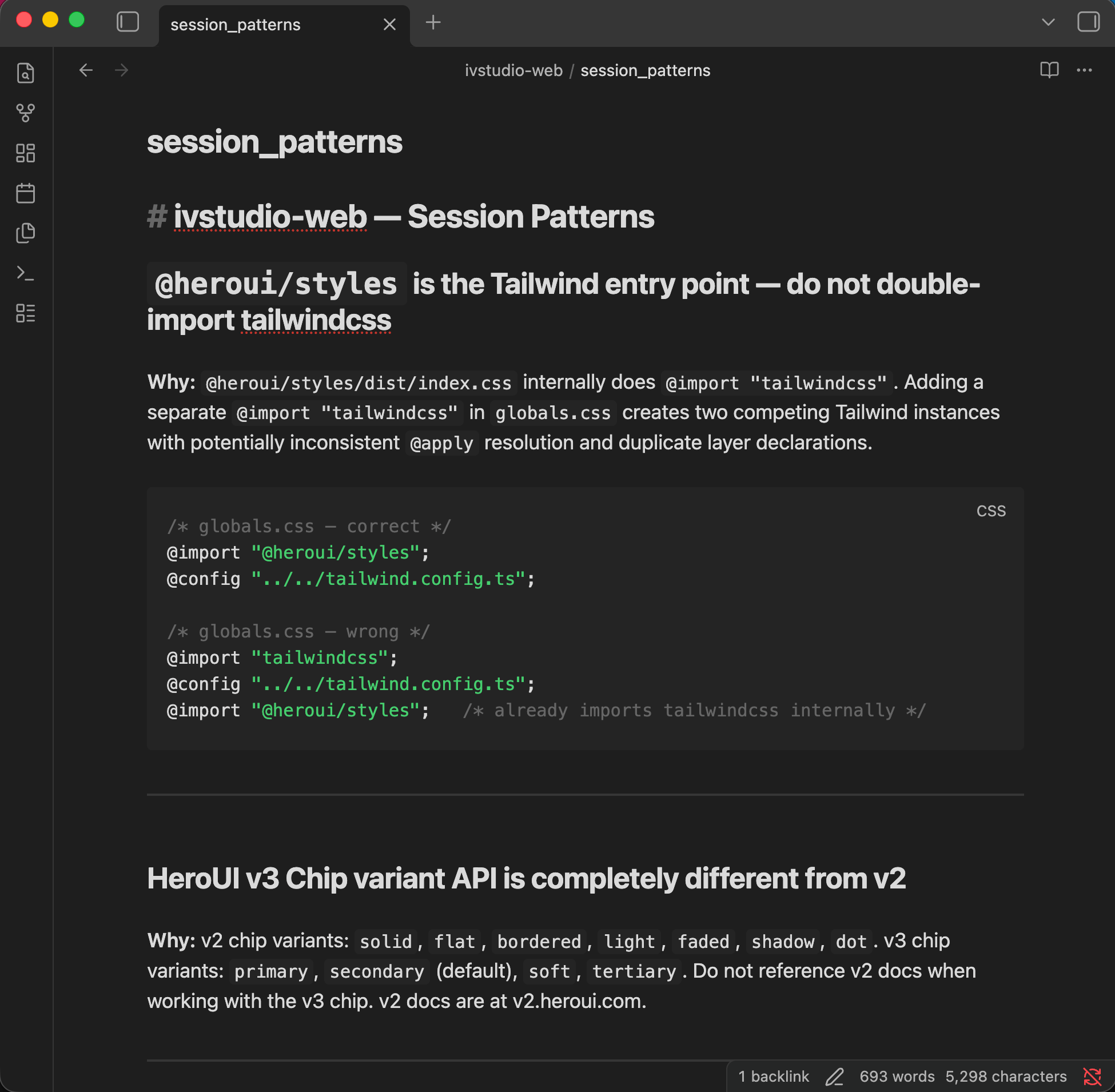
Claude reads the second brain forward. It cares about where you are now and what matters for the current task. Obsidian lets you go the other way. You can trace decisions, revisit context, and see how the system got here. Same files. Different perspective.
Conclusion
Claude by default is a smart stranger. It can solve the problem in front of you, but it does not carry the weight of your past decisions, tradeoffs, or mistakes. The second brain changes the relationship. Not by improving the model, but by giving it continuity. Your continuity.
After a few weeks, the difference is noticeable. Claude flags conflicts with decisions you made months ago. You return after time away and resume from context, not from scratch. Repetition fades. Context persists. That is the leverage. Each session deposits knowledge. Over time, the system compounds. It becomes more aligned, more precise, and more useful, without additional effort during the session itself.
There is no universal structure. The one that works is the one you maintain. Trim aggressively. Add only what proves its value. Optimize for signal, not volume. Start simple. Set up the scaffold once. Close each session with intent. Let the system compound.